
Fantasy Gems Customer Care: How to Reach Real Support Safely
Real Fantasy Gems customer care normally sits inside the app, behind the Customer Service or Support icon. This guide shows how to open it, what to send so your issue is handled faster, and how to avoid the fake helpline numbers that target players in Pakistan.
We are not Fantasy Gems support and cannot access, unlock or refund any account. Never share your password, OTP or wallet PIN with anyone.

In-app chat (typical)
Support Channel
None verified
Public Helpline
Independent guide
This Site
Oct 2026
Reviewed
If you are looking for Fantasy Gems customer care, the most useful thing to know is that genuine support is normally reached from inside the app itself, not through a phone number found on Google. Apps of this kind usually place a Customer Service, Support or Help icon on the home screen or in the profile menu, and it opens a live chat with the platform's own team.
That matters because most support requests involve money: a deposit not credited, a withdrawal still pending, a bonus that did not arrive. People in that position are in a hurry, and fake helpline numbers, fake agents and fake WhatsApp accounts exist to catch players who search for a contact number.
This page explains how to open real support, what to prepare and write, what no genuine agent will ever ask for, and how to escalate when you get no reply.
We are an independent guide, not Fantasy Gems support
This website is not operated by the platform. We cannot see your account, check a transaction, reset a password, unlock a profile or release a withdrawal, and nobody contacting you in our name can either. We do not run a helpline, a WhatsApp number or a Telegram channel for account problems. For anything tied to your account, the only useful route is the support option inside the Fantasy Gems app.
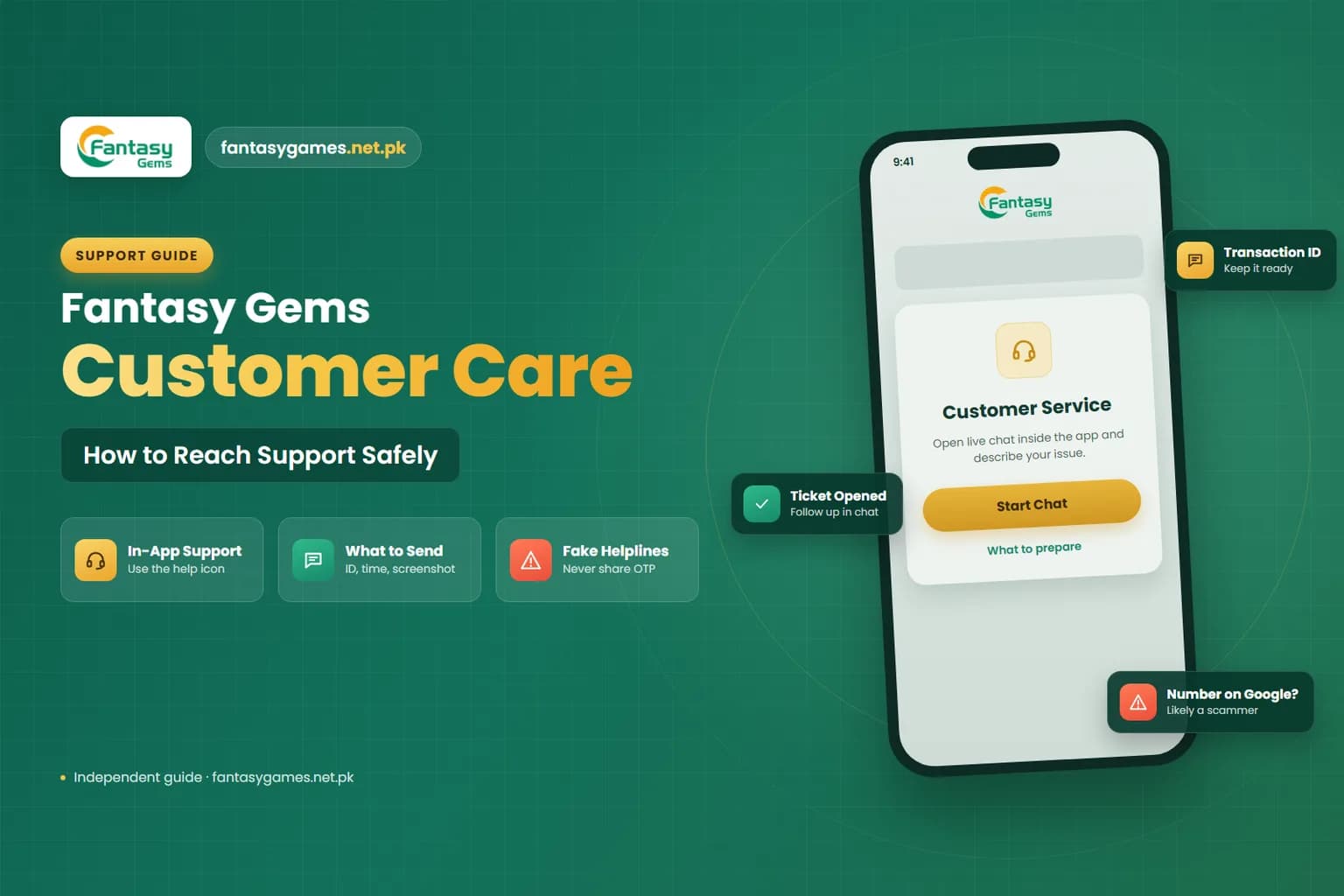
Where Fantasy Gems customer support is normally found
On platforms of this type, support is typically a live chat window built into the app or the platform site, available after you log in. Look for a headset icon, a chat bubble, or a menu item named Customer Service, Support, Help or Online Service. Menu names and icon positions may differ between app versions, so treat these as typical labels rather than exact ones.
Some versions also show a support entry on the login screen for people who cannot sign in, and many place a shortcut on the deposit and withdrawal screens. In-app chat is the safest route because you opened it from an app you installed and logged in to yourself, so you know who you are talking to. A channel you reach by searching gives no such certainty.
How to contact Fantasy Gems customer care inside the app
These steps describe the usual layout. Follow the labels shown on your own screen if they differ.
- 1
Open the Fantasy Gems app you installed yourself and log in with your registered mobile number.
- 2
Go to the home screen or the profile (Me / Account) tab and look for the Customer Service, Support or Help icon.
- 3
Tap it and wait for the chat window to load. Choose the topic that matches your issue if a menu is shown.
- 4
Write one clear message that includes your account ID, what happened, the date and time, and the amount involved.
- 5
Attach screenshots of the error or the payment receipt when the chat offers an attachment option.
- 6
Ask for a ticket or reference number and take a screenshot of the conversation before closing it.
- 7
Return to the same chat for follow-ups so the history stays in one place.
If you cannot log in at all, look for a support or help entry on the login screen itself. Our login guide covers password and OTP recovery steps you can try first.
Quick checks before you message support
A few problems solve themselves or are answered on a screen you already have. Checking these first saves you a wait.
- Open the transaction or wallet history and see whether the deposit or withdrawal is listed as pending, processing, successful or rejected.
- Confirm in your JazzCash, Easypaisa or bank app whether the money actually left or arrived.
- Read the rules shown on the deposit, withdrawal or promotions screen for limits, wagering conditions and stated timeframes.
- Make sure you are logged in to the right account and using the current app version.
- For login trouble, try the Forgot Password option once before asking an agent.
If the history shows a rejected withdrawal, the app often displays a reason. Include that reason in your message.
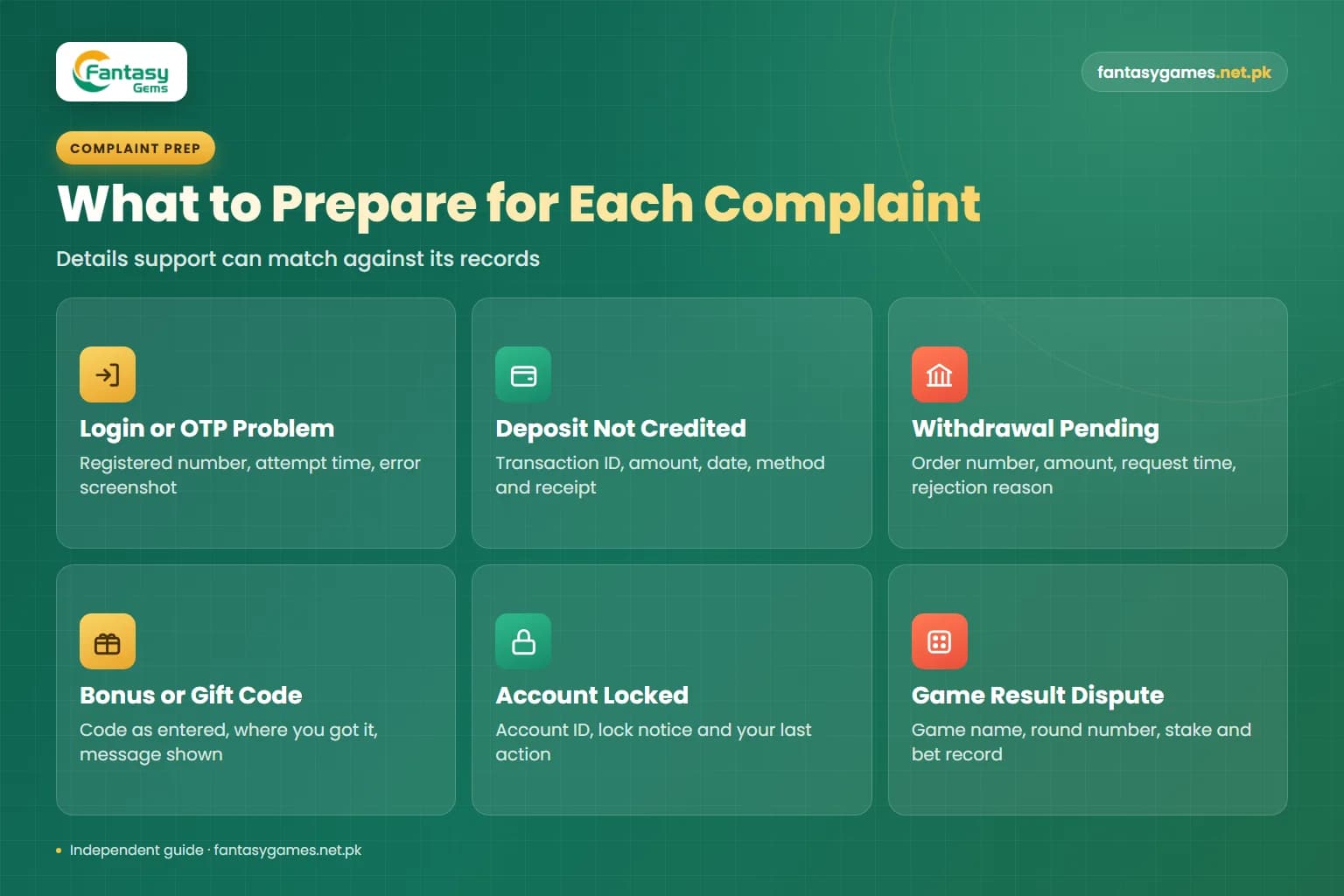
What to prepare for each Fantasy Gems complaint
Support can only act on details it can match against its records. Have these ready before you open the chat.
| Issue type | What to prepare | Guide that covers it |
|---|---|---|
| Login or OTP problem | Registered number, time of the attempt, screenshot of the error message, phone model | Login guide |
| Deposit not credited | Transaction ID from your wallet or bank, amount, date and time, payment method, receipt screenshot | Deposit guide |
| Withdrawal pending or rejected | Withdrawal order number shown in the app, amount, request time, receiving account title, any rejection reason | Withdrawal guide |
| Bonus or gift code not applied | The code exactly as entered, where you got it, time of the attempt, screenshot of the message shown | Gift code guide and bonus guide |
| Account locked or under review | Account ID, registered number, screenshot of the lock notice, the last thing you did before it appeared | Login guide |
| Game result dispute | Game name, round or period number, stake, time, screenshot of the bet record and the result | Wingo game guide and games guide |
Share your registered number and account ID only inside the app's own chat. Never post them in public comments or groups.
What to write in a Fantasy Gems support message
A complete first message avoids several rounds of questions. Use this as a checklist and send everything in one go.
- Your account ID and registered mobile number.
- One sentence stating the problem, for example: deposit paid but not showing in wallet.
- The exact amount in PKR.
- The date and time of the transaction or error.
- The payment method used and the transaction ID or order number.
- What you have already tried, such as restarting the app or checking the history.
- Screenshots of the receipt, the error and the relevant history entry.
- A clear request: please check and share a ticket or reference number.
Keep the tone factual and send it once. Several angry messages in a row do not move you up the queue and make the thread harder to read.
A sample complaint message you can adapt
Here is the shape of a message that tends to get a useful first reply. Replace the bracketed parts with your own details: Hello, my account ID is [ID], registered number [number]. On [date] at [time] I deposited PKR [amount] through [method]. The transaction ID is [ID] and the money has left my wallet, but the balance in the app has not changed. Screenshots of the receipt and my deposit history are attached. Please check and send me a reference number for this complaint.
Notice what is missing: no password, no OTP, no wallet PIN. If identity verification is requested, provide it only inside the app's own chat or verification screen.
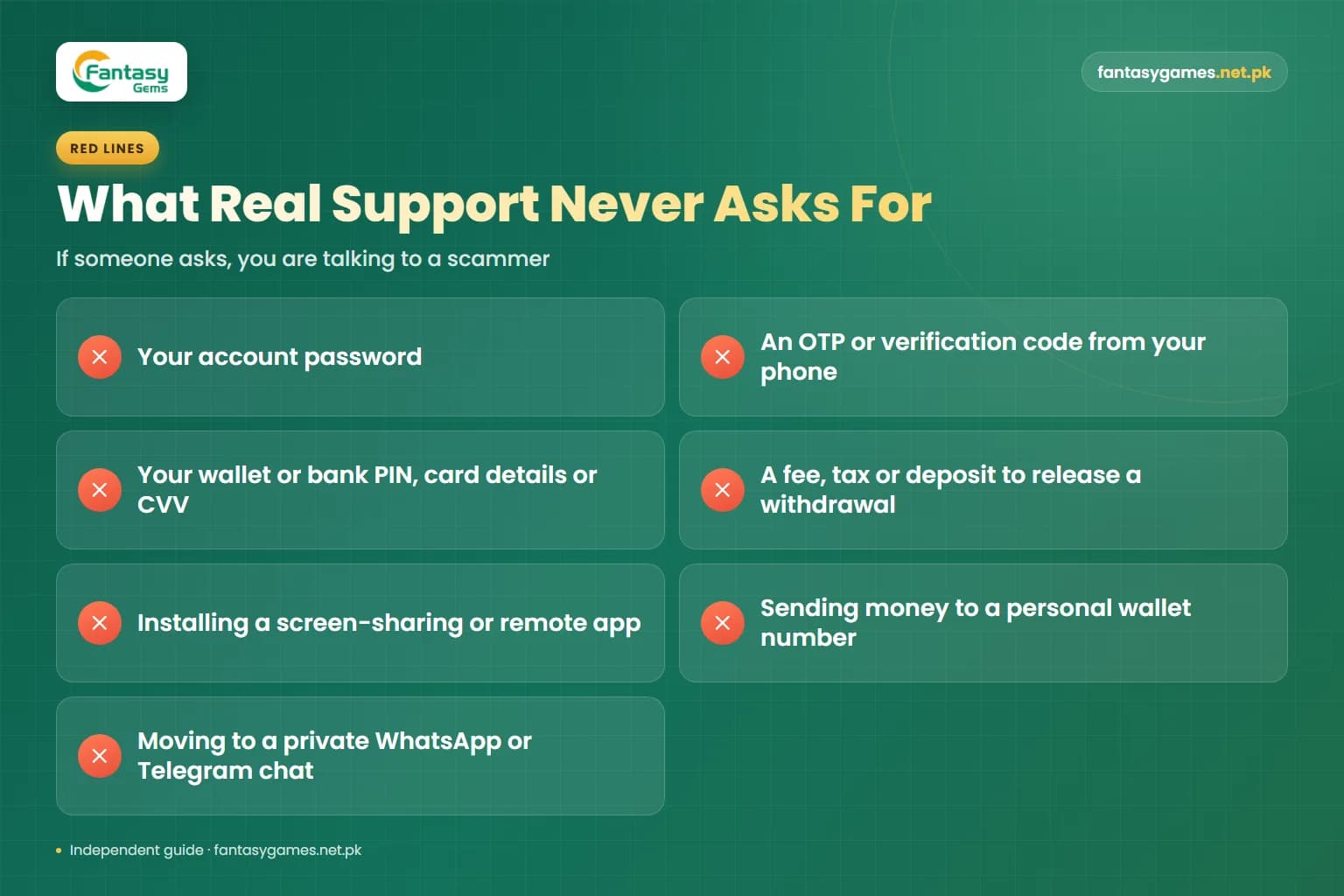
What real support will never ask you for
No legitimate support process needs any of the following. If someone asks, you are talking to a scammer, whatever name or logo they use.
- Your account password.
- An OTP or verification code sent to your phone.
- Your JazzCash, Easypaisa or bank PIN, or your card details and CVV.
- A fee, tax, security deposit or recharge to release a withdrawal or unlock an account.
- Installing a screen-sharing or remote-access app so they can fix it for you.
- Sending money to a personal wallet number to verify your account.
- Moving the conversation to a private WhatsApp or Telegram account.
A request for a fee to release your own money is the single most reliable sign of fraud. Paying it never releases anything; it only leads to a second fee.
Why there is no verified Fantasy Gems helpline or contact number
Many readers arrive here searching for a Fantasy Gems contact number. We have not been able to verify any public helpline number, email address or WhatsApp number as genuinely belonging to the platform, so we do not publish one. Printing an unverified number would put your money at risk.
Numbers that appear in Google results, Facebook posts, YouTube comments, WhatsApp forwards and Telegram groups are frequently placed there by fraudsters. The method is easy: publish a page or comment titled with the app name and the word helpline, wait for a worried player to call, then ask for an OTP, a PIN or a release fee.
If the platform does offer a phone or messaging channel, it will be shown inside the app. Treat that as the only source worth trusting, and even then never hand over a password, code or PIN.
Fake Fantasy Gems customer care scams to recognise
These are the patterns players in Pakistan report most often with real-money apps.
The search-result helpline
A number listed on a web page, map listing or advert. The person who answers sounds professional, then asks for the code that just arrived by SMS.
The agent who messages you first
Someone contacts you on WhatsApp, Telegram or Facebook after you comment about a problem. Genuine support does not go looking for customers in comment sections.
The release-fee demand
You are told your withdrawal is frozen until you pay a tax, a verification deposit or an upgrade charge to a personal wallet account.
The remote-access fix
You are asked to install a screen-sharing app. Once it is running, the caller can watch your OTP messages and open your wallet apps.
Do not repeat a payment while a complaint is open
If a deposit has left your wallet but is not showing, do not send it again to test the system, and do not pay anyone who promises to push it through. Keep the receipt, report it once through the in-app chat with the transaction ID, and wait for an answer. A second payment creates a second problem, and a payment to an individual is almost never recoverable.
How long does Fantasy Gems support take to reply?
There is no guaranteed response time that we can confirm. Live chat on apps of this kind often answers simple questions quickly, while payment investigations commonly take longer because the team has to match your transaction against the payment channel's records. Evenings and weekends tend to be busier.
If the app states a timeframe on the deposit, withdrawal or support screen, use that as your reference rather than a figure quoted on another website. While you wait, keep every record: receipts, screenshots, the chat itself and any reference number. Do not delete the app or clear its data in the middle of a complaint, and do not open a second account to try again.
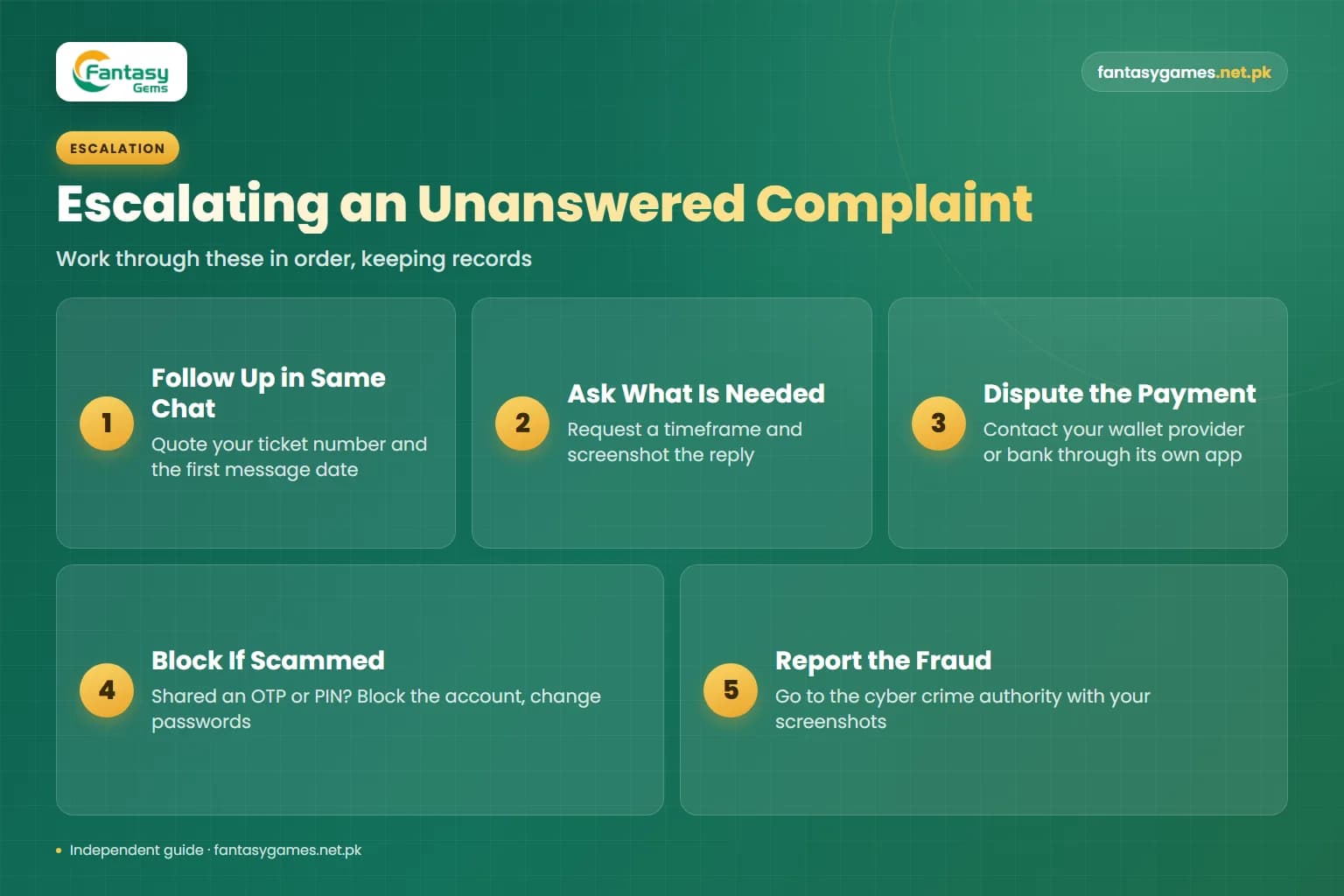
How to escalate a Fantasy Gems complaint that gets no answer
Work through these in order. Each step relies on the records you kept in the one before.
- 1
Follow up in the same chat, quoting your ticket or reference number and the date of your first message.
- 2
Ask plainly what is still needed from you and whether a timeframe can be given, and screenshot the reply.
- 3
For a payment that left your wallet or bank, contact your wallet provider or bank through its own app or the helpline printed inside that app, and raise a transaction dispute with the transaction ID.
- 4
If you paid a scammer or shared an OTP or PIN, call your wallet provider or bank immediately to block the account, then change your passwords.
- 5
Report fraud to the national cyber crime authority, known as the FIA Cyber Crime Wing and now the National Cyber Crime Investigation Agency, with your screenshots and transaction records.
A wallet provider or bank can investigate a transfer on its own network, but it cannot force a gaming platform to credit a balance. Be realistic: money placed on an unregulated real-money app may not be recoverable.
Real-money risk reminder
Support can correct a technical error; it cannot return money lost in play. Real-money games can and do lose money, they are for adults aged 18 and over, and you should only use funds you can afford to lose. Never borrow to play or to chase a loss, and stop depositing while any payment complaint is unresolved.
Fantasy Gems customer care: the short version
Use the support option inside the app, send one complete message with your transaction details and screenshots, ask for a reference number and keep everything. Ignore any helpline number, agent or group you found outside the app, and never give out a password, an OTP or a wallet PIN.
If the in-app team does not respond, follow up in the same thread, then take payment disputes to your wallet provider or bank and fraud to the cyber crime authorities.
Fantasy Gems customer care FAQs
There is no publicly verified Fantasy Gems customer care number that we can confirm, which is why this guide does not list one. Numbers shown in search results, social media posts and messaging groups are often run by scammers. If the platform offers any phone or messaging contact, it will be displayed inside the app's own Customer Service or Help section, and that is the only place to rely on.
Sort the Problem at Its Source
Most support requests start with a login or payment issue. Check the steps in our guides before you open a chat.